Overview
Installation
- Import the plugin package into your project
- Drag the MiniMap prefab from Assets/MiniMap/Map_x to your canvas
- Set the player transform (other points in the map will be relative to it) in MapCanvasController on Canvas/MiniMap scene object
- Add the MapMarker component (Add Componenent -> MiniMap -> Map marker) or drag and drop it from Assets/MiniMap/Scripts to the objects you want to be shown on the map.
Video tutorial
Components description
Map Marker
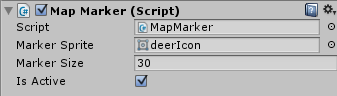
- Marker Sprite – with this image the object will be marked on the map. Sample sprites are included in the package.
- Marker Size – width and height of the marker.
- Is Active – if false – the object won’t be shown on the map.
Map Controller
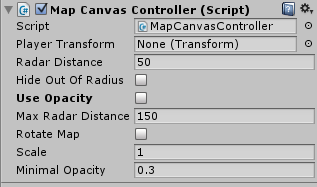
- Player transform - is transform of the object that is the midpoint of the map.
- Radar distance – if the object is within this distance it will be show on the map. If objects are farther than this distance - they will be always on the border of the map or now shown at all, depending on the Hide Out Of Radius value.
- Hide out of radius - if true - the objects that are farther that Radar distance will be hidden. Otherwise they will stick to map border as long as they are within Max radar distance
- Use opacity - if enabled, objects that are far then Radar distance will become more transparent as distance to player increases (but not more then Max radar distance)
- Max radar distance - max possible radar distance (used only if Hide out of radius is false)
- Rotate map - if enabled, the map will rotate and the player arrow will point straight forward, otherwise the map will be fixed and the arrow will show the direction.
- Scale - scales radar distances
- Minimal Opacity - minimal opacity for the markers that are farther than radar distance.
Next pictures will show how the marker will be shown on the map depending on the options:
- Hide out of radius is true:

- Hide out of radius is false, use opacity is false:

- Hide out of radius is false, use opacity is true: